AgentHubAgentHub

Guides·Agent Skills

Skill Hands-on: Install, Trigger, See Real Workflow Results

End-to-end with a code-review style Agent Skill: install from AgentHub → load in Cursor → trigger with matching wording → see structured review output. Same checklist for any skill.

What success looks like

When finished you should see:

  1. SKILL.md on disk (e.g. .cursor/skills/<name>/SKILL.md)
  2. Matching prompts produce structured sections / checklists
  3. Contrast: remove the skill → same question becomes looser

Skills are workflows; MCP is tools. We demo a code-review skill—swap the install command for any AgentHub skill.
Scenario & prerequisites

Goal

Run a structured review on intentionally messy code.

Sample file

mkdir -p ~/Documents/demo-skill && cd ~/Documents/demo-skill

Create buggy.ts with weak typing, console.log, and a loose fetch helper. Open the folder in Cursor.

Find a skill

On /skills search code review / PR / testing. Prefer clear description + full SKILL.md.

Step 1: Install into Cursor from AgentHub

Open the skill detail page → install via:

A|Skills CLI

npx skills add owner/repo@skill-name

B|Manual

Place SKILL.md under .cursor/skills/<name>/ (+ scripts/references if any).

C|curl/zip

Unzip into .cursor/skills/<name>/.

Verify ls .cursor/skills/*/SKILL.md, then Reload Window.

Step 2: Read SKILL.md (when it triggers)

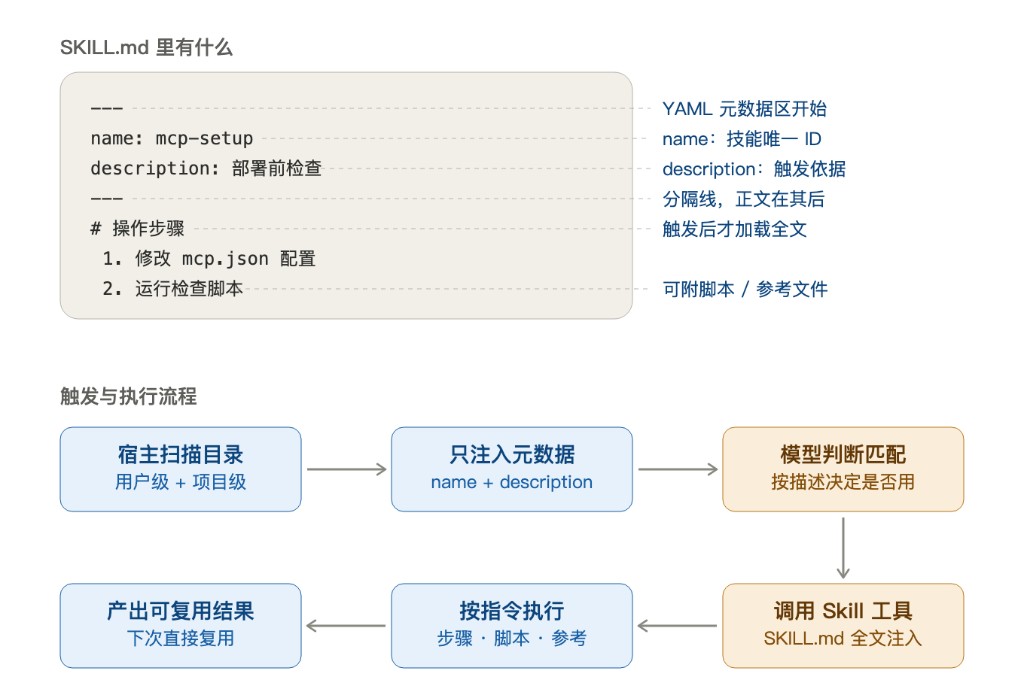
Open SKILL.md and use the diagram below: metadata first, full body only after trigger.

SKILL.md structure and trigger flow: name/description injected first, full text after match

PartRole
nameUnique short id
descriptionTrigger basis—model decides whether to use the skill
Body (steps / scripts / refs)Loaded only after the skill is selected

If description mentions PR/TypeScript review, prompts like “review buggy.ts” trigger it; unrelated chats won’t.

Optional: add locale keywords to description if matching fails, then reload. Keep the body steps—those create the structured effect.

Step 3: Trigger and verify effects

Attach buggy.ts and ask the agent to follow the installed review skill’s format.

Expected

Structured sections: summary, severity-ranked issues, notes on any / console.log, merge advice.

Contrast

Rename .cursor/skills away → reload → same prompt → looser answer → restore.

Force

Use the code-review skill and follow SKILL.md exactly.

Step 4: Reuse for any skill

For every skill page: install → SKILL.md on disk → prompt with description keywords → structured template → remove skill and contrast.

KindAccept when
TestingFramework + edge-case list
PR descriptionTitle / summary / test plan fields
Release checklistCheckboxes, not prose

Need repo/API access? Add MCP: MCP hands-on, Skill vs MCP.

Claude Code & other clients

Claude Code

~/.claude/skills/ or .claude/skills/. Use /skills, then the same review prompts.

OpenClaw

See ClawHub skills. Same accept criteria: structure + contrast.

Shorter notes: Cursor skill setup, Claude Code skill setup.

Troubleshooting & safety

SymptomLikely causeFix
Not triggeringDescription mismatch / no reload / wrong folderMatch wording; use .cursor/skills; reload
Weak outputThin SKILL.mdPick a richer skill or add output format
ConflictsToo many skillsTest with one first
scripts/ riskLocal commandsRead before trust; see skill safety

Every skill detail sidebar links here for the same checklist.

Skill Hands-on: Install, Trigger, See Real - AgentHub