AgentHubAgentHub

Guides·MCP

MCP Hands-on: Install, Call Tools, See Real Results

End-to-end with Filesystem MCP: copy config from AgentHub → wire into Cursor → call tools in chat → see real file/list results. Same flow for any MCP on AgentHub.

What success looks like

When finished you should see all three (missing any = not connected):

  1. Connected in settings: Settings → MCP shows green Connected (or Tools > 0)
  2. Tool calls in chat: e.g. list_directory / read_file
  3. Real local data in the reply—not invented paths

We demo Filesystem MCP. On any AgentHub MCP page, copy that page’s Cursor config—same workflow.

Scenario & prerequisites

Goal

Let Cursor Agent list and read files in a folder you allow:

  • “List files under ~/Documents/demo-mcp”
  • “Read the first 30 lines of README.md there”

Need

  • Cursor (recent stable)
  • Node.js (node -v works; most MCPs start via npx)
  • A practice folder (don’t mount your whole disk)
mkdir -p ~/Documents/demo-mcp
echo "# MCP Demo" > ~/Documents/demo-mcp/README.md
echo "hello from mcp" > ~/Documents/demo-mcp/notes.txt

Find on AgentHub

Open /mcp, search filesystem, open a detail page. Prefer the JSON from that page’s Cursor tab.

Step 1: Copy Cursor config from AgentHub

  1. Open the MCP detail page (filesystem for this demo)
  2. Install section → Cursor tab → Copy

Illustrative JSON:

{
  "mcpServers": {
    "filesystem": {
      "command": "npx",
      "args": [
        "-y",
        "@modelcontextprotocol/server-filesystem",
        "/Users/YOU/Documents/demo-mcp"
      ]
    }
  }
}

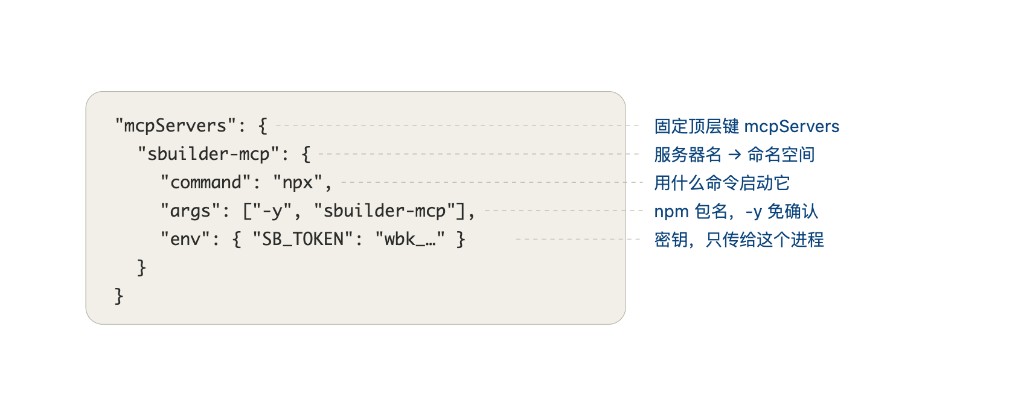
How to read this config

Annotated mcpServers fields: top key, server name, command, args, env

Same shape whether the server is filesystem or sbuilder-mcp as in the diagram:

FieldMeaning
mcpServersFixed top-level key
Server nameNamespace shown in Settings
commandHow to start it (often npx)
argsArgs; -y skips prompts; package/path follows
envSecrets for this process only

Notes

  • Last args entry is often the allowed root—set to your demo-mcp absolute path
  • Fix env placeholders before saving or the server won’t start

Step 2: Write mcp.json and reload

Project-scoped (recommended)

In the open project root:

mkdir -p .cursor

Create/edit .cursor/mcp.json and merge mcpServers (don’t wipe existing keys).

Minimal example:

{
  "mcpServers": {
    "filesystem": {
      "command": "npx",
      "args": [
        "-y",
        "@modelcontextprotocol/server-filesystem",
        "/Users/YOU/Documents/demo-mcp"
      ]
    }
  }
}

Then:

  1. Reload Window
  2. Settings → MCP
  3. Confirm Connected (first npx may take a while)

UI you should see

  • Entry named filesystem (or your key)
  • Tools: list_directory, read_file, …
  • Red/Error → check logs: bad path, Node not on PATH, invalid JSON

Step 3: Call tools and verify effects

In Agent/Composer chat (tools enabled):

Prompt A|list

Use filesystem MCP list_directory on ~/Documents/demo-mcp. Report only tool results—don’t invent files.

Expected A

  • Tool-call chip with that path
  • Both README.md and notes.txt
  • No tool call → MCP not connected / tools disabled

Prompt B|read

Read notes.txt via MCP and quote the content.

Expected B: read_file call + reply contains hello from mcp

Prompt C|contrast

Disable MCP → ask again (can’t see folder) → re-enable → real content returns. That’s MCP.

Step 4: Reuse for any MCP

Any MCP on AgentHub: copy → merge + secrets → reload/Connected → verify with a tool-forcing prompt.

Verification by type

TypePromptExpected
BrowserOpen example.com via MCP; report titlenavigate/snapshot tools; real title
GitHubList 5 recent issuestoken required; real titles/numbers
DatabaseSELECT 1 or list tablesreal rows; bad DSN → tool error

Detail sidebars link back here for the same checklist.

Claude Code & other clients

Claude Code

Copy the Claude Code command from AgentHub, run it, then verify with the same list/read prompts. Use claude mcp list.

Other IDEs

Use that client’s tab on the detail page. Success criterion: tool calls + real data.

Shorter notes: Cursor MCP setup, Claude Code MCP setup.

Troubleshooting checklist

SymptomLikely causeFix
Invalid JSONMissing comma, comments, smart quotesValidate JSON, then reload
Connected but 0 toolsWrong package or crashRead MCP logs
Tool deniedPermissions / auto-run offApprove or enable tool run
Path deniedOutside allowed rootAdjust allowed path (expected)
npx failsProxy / networknpm mirror or global install
Secrets riskKeys in committed configDon’t commit secrets; see MCP safety

After this lab, every MCP detail page uses the same accept criteria: tool call + real result.

MCP Hands-on: Install, Call Tools, See Real - AgentHub