





Two browsers: one for your agents, one for you.
Free · Open source · Everything runs on your machine
#  BrowserOS neo: the browser for your agents
What is BrowserOS neo? A second browser, just for your AI agents. Import your logins from Chrome in one click, connect Claude Code, Codex, or any MCP agent, and hand off your web tasks. Agents run in parallel in their own tabs. You watch live, or replay any session like a video.


Get started
- Install BrowserOS neo and import from Chrome in one click: logins, bookmarks, extensions.
- It finds your agents. Claude Code, Codex, Cursor, VS Code, OpenClaw, Hermes; connect with one click.
- Give it a task from your agent. "Book me the cheapest flight to London." Watch it live from your new tab, replay it later.
To be clear, BrowserOS neo is NOT a Chrome replacement. It's a secondary browser that sits next to Chrome, and we’ve made it agent friendly.
What can your agents do?
Anything that needs a logged-in browser:
- Post content to your social media (LinkedIn, Twitter/X), queue posts, pull engagement numbers
- Clear your inbox, unsubscribe from junk email
- Update your CRM, file expenses, pull reports from internal tools
Key features
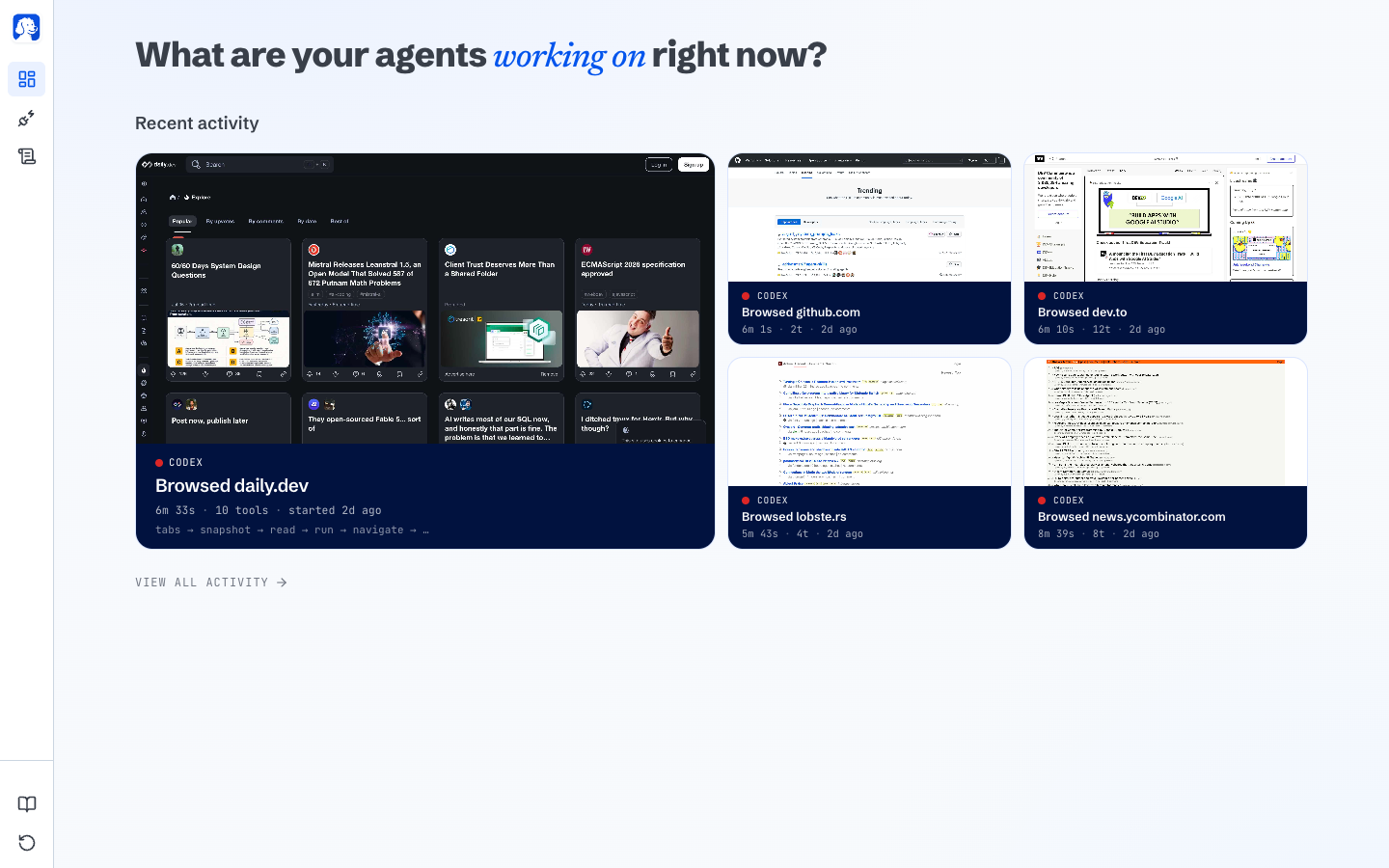
Live dashboard
Your new tab shows every agent working right now: which site it's on, what it's doing, how far along. Docs
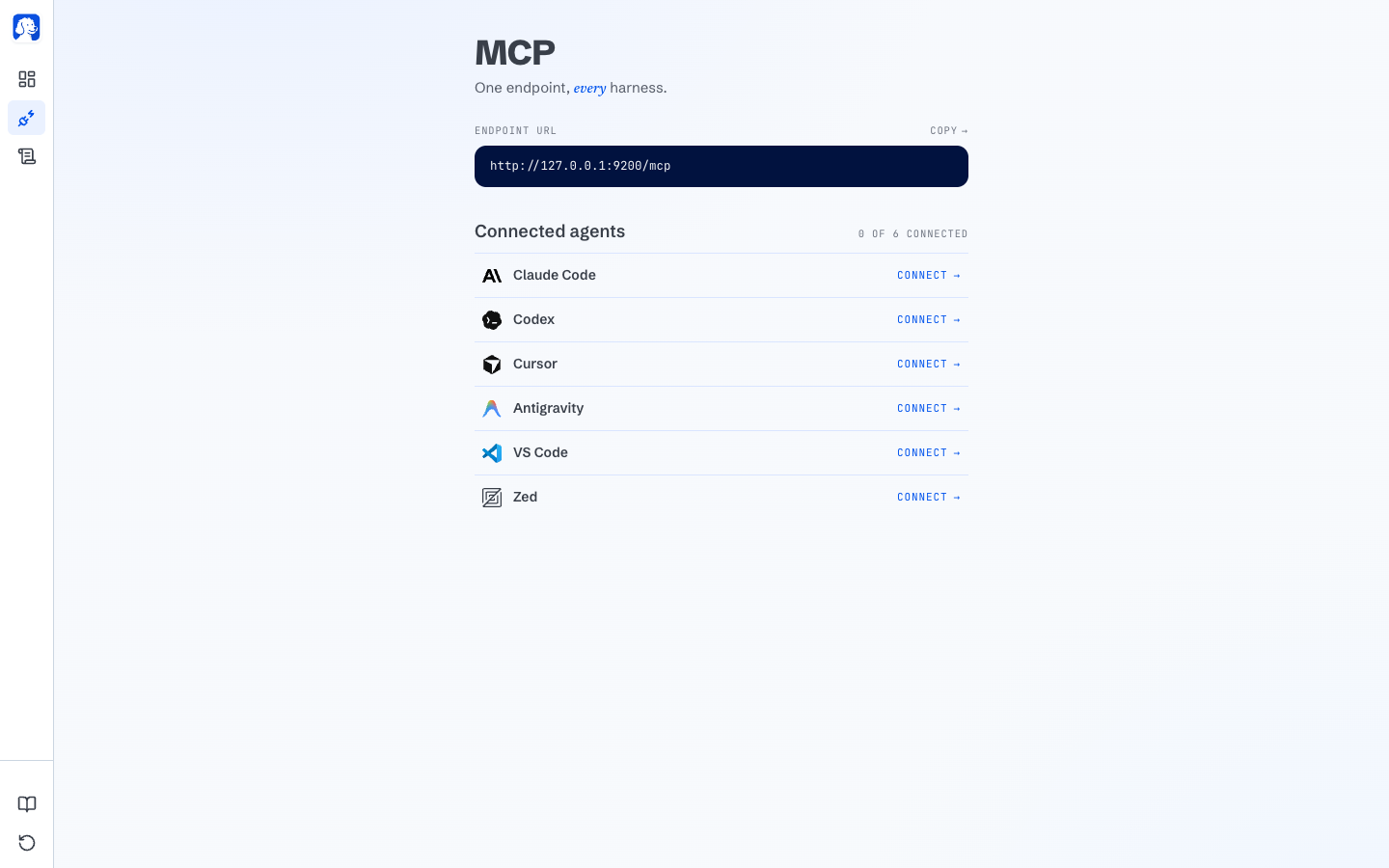
One-click connect
Automatically connects to every harness. We built tools optimized for web use! Docs
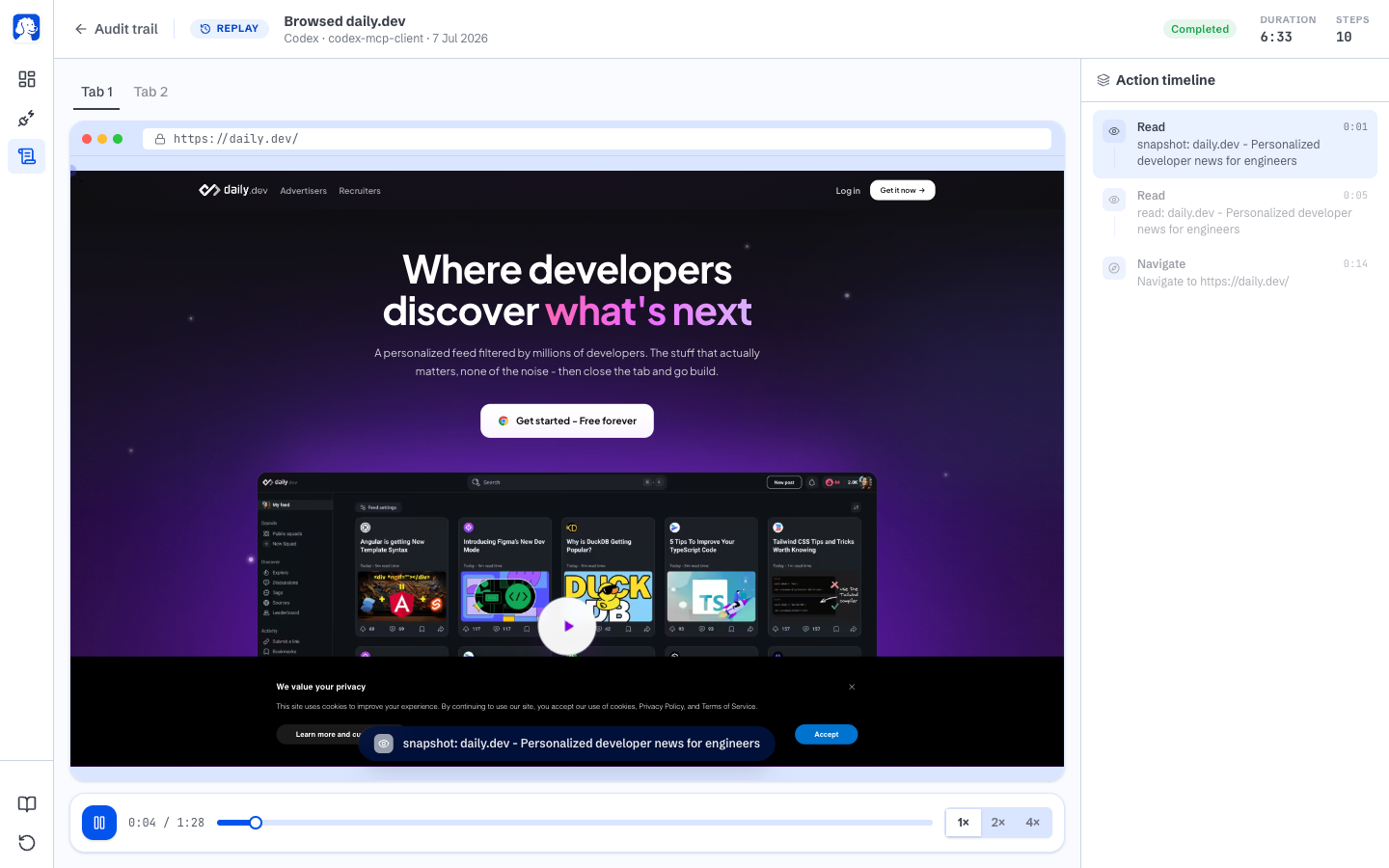
Replay every session
Every session is saved as a scrubbable video on your disk with a step-by-step action timeline. Rewind and see exactly what happened. Docs
- Your logins. Agents automate your real work using your logged-in accounts, not a blank sandbox. How it works
- Parallel agents. Fire off several tasks at once. Each agent works in its own tab while you keep browsing.
- Fewer tokens. For the same task, BrowserOS neo consumes significantly less tokens compare to other solutions (like Claude's chrome extension, Codex browser).
- Local-only, privacy-first. Sessions, screenshots, and history live under
~/.browserclaw/and never leave your machine. Privacy
Why BrowserOS neo over the alternatives?
- Not a headless driver. Playwright and agent-browser spin up a fresh Chrome subprocess with no logins. Great for CI, useless for real work which requires your logged-in state like "read my inbox." BrowserOS neo imports your logins with one click and persists it across sessions.
- Not a cloud browser. Cloud browsers (like browser-use, browserbase) run in a datacenter, so logging into your accounts is a pain, and sites like Twitter and LinkedIn block you because you are on a datacenter IP. BrowserOS neo runs on your machine, on
127.0.0.1. - Not a locked-in AI browser. Atlas, Comet, and Dia only work with their own AI. BrowserOS neo works with the agents you already use and pay for -- Claude Code, Cowork, Codex, Cursor, etc.
#  BrowserOS: the AI browser for humans
What is BrowserOS? BrowserOS is a free, open-source Chromium fork with an AI agent built into every new tab. Ask it to summarise a page, click through a flow, extract data, or run a scheduled task, and it uses 20+ built-in tools plus 40+ app integrations to get the work done. Bring your own AI keys or run everything locally with Ollama.
Every AI browser today asks you to sign into their cloud and hand over your data. BrowserOS is the one that doesn't. Same daily browser you already use, with a helpful agent one keystroke away.


Get started
- Download and install BrowserOS: macOS · Windows · Linux (AppImage) · Linux (Debian).
- Import from Chrome in one click. Bookmarks, passwords, extensions all carry over.
- Connect your AI provider. Claude, OpenAI, Gemini, ChatGPT Pro via OAuth, or local models via Ollama or LM Studio.
Key features
BrowserOS agent in action
Ask it in plain English. 20+ built-in tools plus 40+ app integrations (Gmail, Slack, GitHub, Linear, Notion, and more). Docs

Install as MCP and control from claude-code
Turn BrowserOS into an MCP server and drive it from Claude Code, Cursor, or any MCP client. Docs
Use BrowserOS to chat
Chat about the current page from the side panel. Summarise, ask questions, transform what you're reading. Docs
Use BrowserOS to scrape data
Point the agent at a page, tell it what to pull, and get structured data back. Docs
- Cowork with files. Combine browser automation with local file operations in one session. Docs
- Scheduled tasks. Run agents on autopilot: daily, hourly, or every few minutes. Docs
- Bring your own AI. 11+ providers, or fully local with Ollama and LM Studio. Provider list
- Real ad blocking. uBlock Origin with full Manifest V2 support. Docs
Why BrowserOS over the alternatives?
- Not Chrome with an AI extension. Extensions can't touch the browser chrome, can't run scheduled background tasks, can't ship the 20+ built-in tools that the agent uses natively. BrowserOS builds the agent into Chromium itself.
- Not Comet, Atlas, or Dia. Those AI browsers route your prompts through their cloud with their model. BrowserOS runs on your machine with your AI keys. Your data stays yours.
How BrowserOS compares
| BrowserOS | Chrome | Brave | Dia | Comet | Atlas | |
|---|---|---|---|---|---|---|
| Open Source | ✅ | ❌ | ✅ | ❌ | ❌ | ❌ |
| AI Agent | ✅ | ❌ | ❌ | ❌ | ✅ | ✅ |
| MCP Server | ✅ | ❌ | ❌ | ❌ | ❌ | ❌ |
| Cowork (files + browser) | ✅ | ❌ | ❌ | ❌ | ❌ | ❌ |
| Scheduled Tasks | ✅ | ❌ | ❌ | ❌ | ❌ | ❌ |
| Bring Your Own Keys | ✅ | ❌ | ✅ | ❌ | ❌ | ❌ |
| Local Models (Ollama) | ✅ | ❌ | ✅ | ❌ | ❌ | ❌ |
| Local-first Privacy | ✅ | ❌ | ✅ | ❌ | ❌ | ❌ |
| Ad Blocking (MV2) | ✅ | ❌ | ✅ | ❌ | ✅ | ❌ |
FAQ
What's the difference between BrowserOS neo and BrowserOS? BrowserOS neo is a browser your AI drives. BrowserOS is a browser you drive, with an AI agent built in. Both ship from this repo and run side by side. Keep your daily browser, and let agents work in neo.
Which AI tools work with BrowserOS neo? Any AI that speaks MCP. Claude Code, Codex, Cursor, VS Code, Zed, OpenCode, Hermes, OpenClaw and Antigravity connect with one click.
Does anything leave my machine?
Your sessions, screenshots, history, and settings live under ~/.browserclaw/ and never upload. BrowserOS neo sends anonymous product-usage events (agent connect/disconnect, version, OS) to help us improve the app; it never sends URLs, page content, prompts, tool results, or screenshots. Off with one toggle in Settings. Full policy.
Do my Chrome extensions and bookmarks work? Yes. Both browsers are Chromium forks, so Chrome extensions work and your bookmarks, passwords, and settings import in one click.
What platforms are supported? BrowserOS neo runs on macOS and Windows. BrowserOS runs on macOS, Windows, and Linux. System requirements match Google Chrome.
Get help
Architecture
Both products ship from this monorepo. Two main subsystems: the browser (Chromium fork) and the agent platform (TypeScript/Go).
BrowserOS/
├── packages/browseros/              # Chromium fork + build system (Python)
│   ├── chromium_patches/            # Patches applied to Chromium source
│   ├── build/                       # Build CLI and modules
│   └── resources/                   # Icons, entitlements, signing
│
├── packages/browseros-agent/        # Agent platform (Rust/TypeScript/Go)
│   ├── apps/
│   │   ├── claw-server-rust/        # BrowserOS neo backend: MCP endpoint + JSON API (Rust)
│   │   ├── claw-app/                # BrowserOS neo dashboard extension (WXT + React)
│   │   ├── claw-onboard/            # BrowserOS neo onboarding flow
│   │   ├── server/                  # BrowserOS MCP server + AI agent loop (Bun)
│   │   ├── app/                     # BrowserOS extension UI (WXT + React)
│   │   └── cli/                     # CLI tool (Go)
│   │
│   └── packages/
│       ├── cdp-protocol/            # CDP type bindings
│       └── shared/                  # Shared constants
| Package | What it does |
|---|---|
packages/browseros | Chromium fork: patches, build system, signing |
apps/claw-server-rust | BrowserOS neo backend: MCP endpoint agents connect to, plus the API behind the dashboard |
apps/claw-app | BrowserOS neo new-tab dashboard: watch, replay, and manage agent sessions |
apps/server | Bun server exposing the browser MCP tools and running the BrowserOS AI agent loop |
apps/app | BrowserOS extension: new tab, side panel chat, onboarding, settings |
apps/cli | Go CLI: control BrowserOS from the terminal or AI coding agents |
cdp-protocol | Type-safe Chrome DevTools Protocol bindings |
Contributing
We'd love your help making BrowserOS and BrowserOS neo better. See the Contributing Guide for details.
- Agent development (TypeScript/Go): see the agent monorepo README for setup.
- Browser development (C++/Python): requires ~100GB disk space. See
packages/browserosfor build instructions.
Credits
- ungoogled-chromium: we use some of its patches for enhanced privacy. Thanks to everyone behind this project.
- The Chromium Project: at the core of both browsers, making it possible for them to exist in the first place.
Citation
If you use BrowserOS or BrowserOS neo in your research or project, please cite:
@software{browseros2025,
  author = {Nithin Sonti and Nikhil Sonti and {BrowserOS-team}},
  title = {BrowserOS: The open-source Agentic browser},
  url = {https://github.com/browseros-ai/BrowserOS},
  year = {2025},
  publisher = {GitHub},
  license = {AGPL-3.0},
}
License
BrowserOS and BrowserOS neo are open source under the AGPL-3.0 license.
Copyright © 2026 Felafax, Inc.
Stargazers
Thank you to all our supporters.
| Nikhil | Nithin | Dani | | | | |
Built with ❤️ from San Francisco